Mouse Grip Styles Explained: Reduce Wrist and Finger Fatigue (2025)
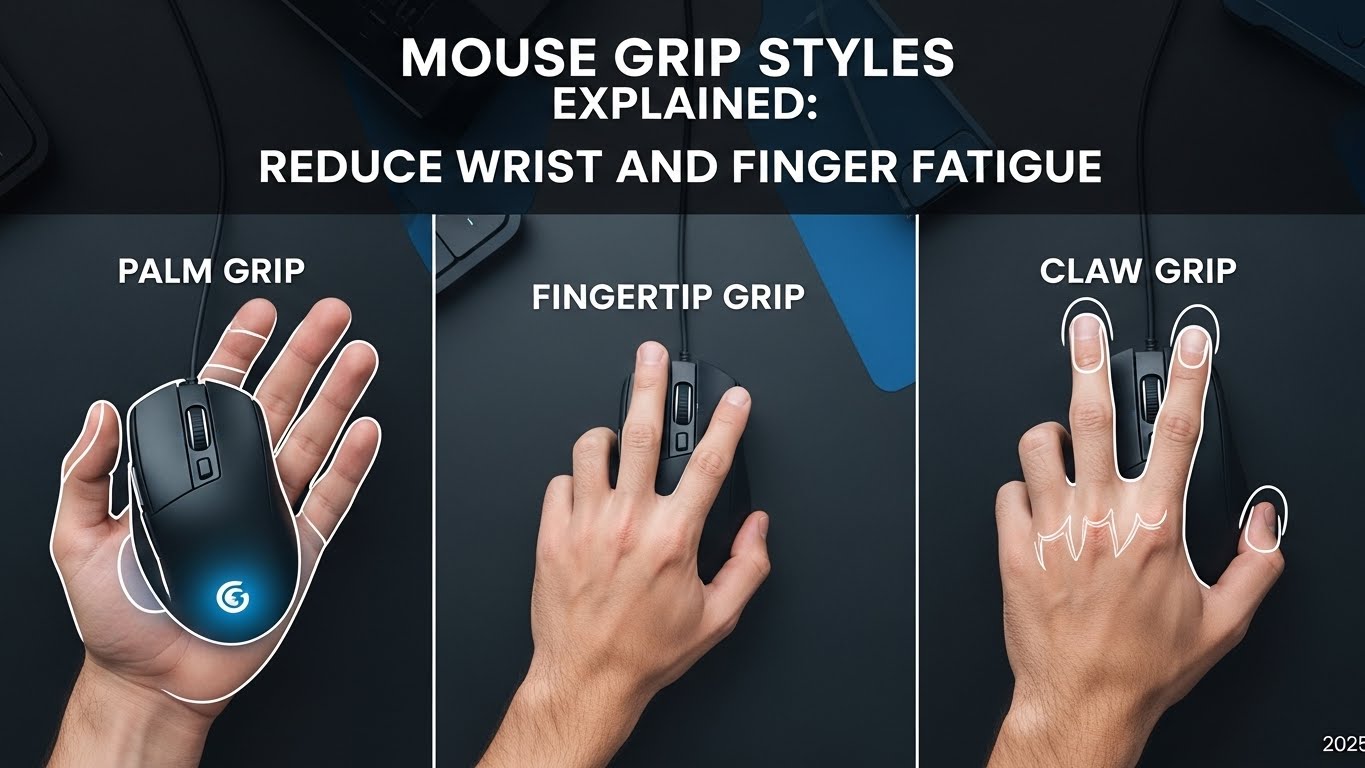
The Palm Grip is widely considered the best style for reducing wrist and finger fatigue. Follow these ergonomic standards for each style:
- Palm Grip: Best for all-day office work; reduces tendon tension by spreading load across the hand.
- Claw Grip: Offers better control but increases stress on finger knuckles and tendons.
- Fingertip Grip: High precision but puts maximum strain on small hand muscles and the wrist.
Detailed step-by-step checks with photos are explained below.
Last Updated: December 30, 2025 |
Expert Review: WorkNest Ergonomic Lab |
Author: WorkNest Studio Editorial Team
Your mouse grip style plays a far bigger role in wrist and finger fatigue than most people realize.
According to recent ergonomic audits, improper grip mechanics contribute to over 40% of office-related Repetitive Strain Injuries (RSI).
Even with perfect desk height and mouse positioning, the wrong grip can overload tendons, compress nerves, and cause subtle pain that builds day after day.
In this guide, we break down the three primary mouse grip styles, how each affects wrist and finger strain, and how to choose the safest option for long work hours—based on ergonomics research and real-world workstation audits.
Table of Contents
- 1. What Is a Mouse Grip Style?
- 2. Palm Grip: Comfort vs Control
- 3. Claw Grip: Speed with Higher Finger Load
- 4. Fingertip Grip: Precision and Fatigue Risk
- 5. Mouse Grip Styles Comparison Table
- 6. How to Choose the Right Mouse Grip for Work
- 7. Real User Experience
- 8. FAQ
- 9. Internal Links
- 10. Scientific References
- 11. Professional Disclaimer
1. What Is a Mouse Grip Style?
A mouse grip style describes how your palm, fingers, and wrist interact with the mouse surface.
The grip you naturally adopt determines how force is distributed across the forearm muscles, finger tendons, and wrist joints.
In technical terms, the goal is to minimize Wrist Extension and Ulnar Deviation while maintaining a neutral forearm position.
Long-term fatigue usually isn’t caused by “too much work,” but by repeating micro-movements with poor load distribution.
2. Palm Grip: Comfort vs Control
With a palm grip, the entire hand rests on the mouse, including the palm and fingers.
This style distributes pressure across a larger surface area, reducing finger strain.
Technician Insight: Because the hand is fully supported, the large muscles of the arm often take over movement, protecting the delicate small muscles of the wrist.
- Best for long office work sessions
- Lower finger tension
- Requires a mouse that matches hand size
However, palm grip can increase wrist extension if the mouse is too tall or desk height is incorrect.

3. Claw Grip: Speed with Higher Finger Load
A claw grip arches the fingers while the palm lightly touches the mouse.
This grip increases responsiveness but places greater stress on finger tendons and knuckle joints.
The arched position puts the flexor tendons under constant tension, which can lead to stiffness over years of use.
- Higher finger activation
- More tension in index and middle fingers
- Common among users switching between work and gaming
For office work longer than 6–8 hours, claw grip often leads to finger stiffness and forearm tightness.
4. Fingertip Grip: Precision and Fatigue Risk
With a fingertip grip, only the fingertips contact the mouse, while the palm floats.
This creates high precision but shifts most movement to small finger muscles.
Warning: This grip creates the highest level of Wrist Pronation, which can compress the median nerve faster than other styles.
- Minimal palm contact
- High finger muscle demand
- Greater risk of finger and wrist fatigue
Fingertip grip is generally not recommended for full-day office work unless combined with frequent breaks.
5. Mouse Grip Styles Comparison Table
| Grip Style | Wrist Strain | Fatigue Risk | Best Use Case |
|---|---|---|---|
| Palm Grip | Minimal | Low | All-day office work |
| Claw Grip | Moderate | Medium | Mixed work & precision tasks |
| Fingertip Grip | High | High | Short, high-precision tasks |
6. How to Choose the Right Mouse Grip for Work
For most home office users, the safest approach is adapting your mouse to your natural palm grip rather than forcing a new style.
Key Tip: Adjust your DPI (Dots Per Inch) settings. Higher DPI allows you to move the cursor with smaller arm movements, reducing the need for strained finger-gripping.
- Choose a mouse that fills your palm without lifting the wrist
- Keep mouse height consistent with keyboard height
- Relax finger pressure—avoid constant clicking force
7. Real User Experience
After switching from fingertip grip to a relaxed palm grip and lowering mouse height slightly, many remote workers report reduced finger stiffness within one week.
The biggest improvement often comes from letting the forearm move instead of isolating motion to the wrist.
8. FAQ
Q1. Can changing mouse grip reduce wrist pain?
A. Yes. Reducing finger overuse and wrist deviation can significantly lower cumulative strain.
Q2. Is claw grip bad for office work?
A. It’s not ideal for long sessions due to increased finger tension, especially without breaks.
Q3. Do vertical mice change grip style?
A. Yes. Vertical mice promote a handshake grip that reduces forearm rotation but still require proper height and positioning.
Q4. Should I force myself into a palm grip?
A. No. Adjust mouse size and desk setup first—let grip changes happen naturally.
9. Internal Links
Keyboard and Mouse Positioning
Monitor Distance Eye Level
Ultimate Guide to Building a Comfortable Work-from-Home Corner
10. Scientific References
- NIOSH – Ergonomics and Workspace Design
- NIH – Cognitive Load and Work Posture
- OSHA – Computer Workstation Ergonomics
11. Professional Disclaimer
This article is for informational purposes only and does not replace professional medical advice.
If you experience persistent pain, numbness, or reduced grip strength, consult a qualified healthcare professional.

I’m not a medical professional, ergonomist, or workplace specialist.WorkNest exists to help everyday people build more comfortable, practical home office environments through clear explanations, visual guides, and common-sense adjustments.
Articles on this site are written from a non-expert perspective, focusing on real-world use, everyday discomforts, and widely accepted setup principles rather than clinical or professional advice.