Home Office Lighting Setup: Best Lighting Practices to Reduce Eye Strain
Last Updated: 2025-12-08
Home office lighting setup is one of the biggest factors that influences eye strain, posture, and overall comfort during long workdays. Poor lighting forces your eyes to work harder, makes you lean toward the screen, and can even shift your head posture forward—leading to neck and shoulder tension. This guide explains the most effective, evidence-informed lighting practices used in ergonomic workspaces, helping you build a home office setup that minimizes glare, protects your eyes, and keeps your posture neutral.
Table of Contents
- Why Proper Lighting Matters
- Types of Lighting Needed for a Home Office
- Best Color Temperature for Eye Comfort
- Correct Lighting Placement Around Your Desk
- How Lighting Affects Screen Glare & Contrast
- Window Position, Natural Light & Reflection Control
- Choosing the Right Desk Lamp
- Troubleshooting Common Lighting Problems
- Lighting Setup Checklist
- FAQ
- Internal Links
- Disclaimer
- Sources & Transparency
- Author
Why Proper Lighting Matters
Lighting affects the way your eyes focus on the screen, how often you blink, and how your head aligns while viewing your monitor. Eye strain often begins when the surrounding environment is significantly brighter or darker than the screen itself. When the environment is unbalanced, your eyes constantly adjust, increasing fatigue and drying. Poor lighting also encourages leaning forward, which contributes to forward-head posture and muscle tension.
Types of Lighting Needed for a Home Office
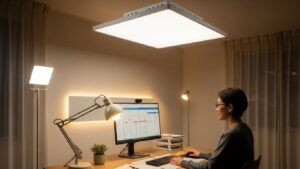
An effective home office lighting setup consists of three main components:
- Ambient lighting — overall room light
- Task lighting — desk lamp used for reading or typing
- Accent lighting — optional background lighting that reduces contrast
Best Color Temperature for Eye Comfort
Color temperature influences alertness and comfort. Ergonomic guidelines and visual comfort research typically recommend:
- 3500–4500K for desk work (neutral white)
- 5000K+ for tasks requiring high detail
- 2700–3000K for evening work to reduce stimulation
Lighting that is too cool (6000K+) increases eye strain, while lighting too warm (2700K) may feel dim for detailed work. A balanced neutral white is ideal for most home offices.
Correct Lighting Placement Around Your Desk
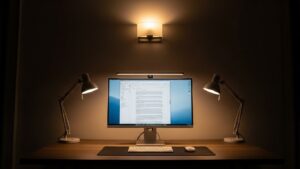
Placement determines how light interacts with your monitor and your eyes. The most effective rules include:
- Place the main light source in front of you or diagonally forward to avoid shadows.
- Never position strong lights directly behind your monitor.
- Use task lighting on the opposite side of your writing hand.
- Keep light sources outside your direct line of sight.
How Lighting Affects Screen Glare & Contrast
Glare is a major cause of eye fatigue. It occurs when bright light reflects off your screen. To reduce glare:
- Use a matte monitor or apply a glare-reducing filter.
- Avoid placing lamps behind you or overhead lights directly above the screen.
- Lower monitor brightness when the room is darker.
- Increase ambient light if the screen appears too bright.
Window Position, Natural Light & Reflection Control
Natural light is beneficial when used correctly. Poor window placement, however, can cause harsh reflections. Follow these rules:
- Position your desk perpendicular to windows.
- Use blinds or sheer curtains to soften harsh sunlight.
- If backlighting occurs behind the monitor, reposition the desk.
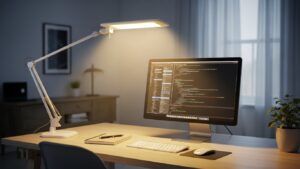
Choosing the Right Desk Lamp
The best home office desk lamps share these qualities:
- Adjustable brightness (dimming capability)
- Wide lighting coverage
- Neutral color temperature range
- Anti-glare shade or diffuser
- Flexible positioning arm
Troubleshooting Common Lighting Problems
• Eyes feel tired after work
Increase ambient lighting and reduce contrast between screen and surroundings.
• Glare on the monitor
Reposition desk or lamp; use blinds; tilt monitor slightly downward.
• Headaches from bright light
Switch to a lower brightness or softer color temperature.
• Leaning toward the screen
Ambient lighting may be too dim. Increase brightness to reduce forward posture.
Lighting Setup Checklist
- Color temperature 3500–4500K
- Ambient + task light combined
- Desk placed perpendicular to windows
- No lights behind the monitor
- Soft shadows, no harsh contrast
FAQ
1. What lighting reduces eye strain the most?
Neutral white (3500–4500K) with balanced ambient and task lighting works best.
2. Should desk lamps face the screen?
No. They should illuminate your work area without shining directly toward your eyes or monitor.
3. Are LED desk lamps good for home office work?
Yes—LED lamps with adjustable brightness and temperature are ideal.
4. Why does natural light sometimes make eye strain worse?
Harsh sunlight creates reflection and glare on your screen.
5. Is cool white or warm white better?
Neutral white provides the best balance for long-hour productivity.
Internal Links
Disclaimer
This guide provides general ergonomic recommendations for comfort and visual balance. It does not provide medical or clinical advice.
Sources & Transparency
Author
Written by: Home Office Setup Project — Evidence-Informed Ergonomic Guidance

I’m not a medical professional, ergonomist, or workplace specialist.WorkNest exists to help everyday people build more comfortable, practical home office environments through clear explanations, visual guides, and common-sense adjustments.
Articles on this site are written from a non-expert perspective, focusing on real-world use, everyday discomforts, and widely accepted setup principles rather than clinical or professional advice.